Software
PicoScope Streaming
All the data is gathered from the Picoscope using the amazing open source pico-sdk crate from Meaty Solutions. It’s a set of high-level, high performance, and gapless bindings and wrappers that’s driver and platform agnostic. We built in a startup CLI to find the picoscope, set speed, voltages and channels, and the sdk configures and sets up the Picoscope which then starts sending data every ~100ms to an event listener. This allows us to simply create a new thread to start the data processing.
Data Processing
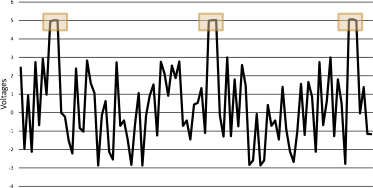
Currently all we have is an stream of raw data points which we need to do 3 operations on to split into an clean set of virtual channels:
- Find pulses from arduino
- Take find all the data points that are outside of the range that the amplifiers are tuned to produce
- Block together the sync pulse data points, and throw out any out of place
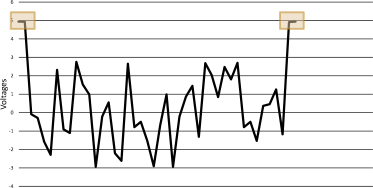
- Create vector of center of Sync pulses
- Use synchronisation pulses to estimate where the center of the virtual channel locations are going to be
- Find the difference between the last sync pulse next sync pulse
- Use difference to create a vector of pointers to virtual channels
- Take an average of the tertile of the estimated virtual channel range
- Iterate over virtual channel pointers and create a slice of the tertile (middle third) of the virtual channel
- Take a mean or mode depending on the data range.
Once processed, the state mutex is unlocked and the vector of virtual channels (map of channel id’s to f64 data points) is moved over, and the thread terminates.
Exporting and Visualization
Because of the amount of data, we can’t keep everything in ram, so once we have a second of data, we start the next phase of processing. In the current state of the program, this means that we only save this to an CSV in a folder, for the Jupyter Notebooks to use for visualization and debugging purposes. But this is also designed to hook in any post processing, in particular FFT (Fast Fourier Transform).
The current visualizations are done in Jupyter Notebooks (Interactive Ipython Notebook) because it’s not realtime, allowing for far more leniency on processing time.
User Interfaces
We built in two interfaces for development and testing, a CLI and a webapp. The web app is currently disablebed because it wasn’t able to keep up with the raw data stream, and hasn’t been reimplemented with the newer processed data API’s. The CLI is still operational and is used to configure the picoscope, start/stop the recording process, and gain insights into performance and data errors in real time. The Webapp is the planned final interface, but less applicable with the current debugging.
Hardware
Headset
For our headset, we went with the safe option of using an almost off the shelf headset: OpenBCI ul-tracortex Mark IV. We printed the frame in two halves on a Formbot TRex 3.0 and purchased a set of probes (20 probes, and some fillers for comfort). We then assembled the headset, placing the probes in accordance with the 10-20 system.
Circuit in detail
The design at its core is a microcontroller controlling dual de-multiplexers, one connected to +5v, the other connected to ground, which selectively powers one amplifier at a time. The amplifiers just output onto a shared bus which feeds into the input feed of the oscilloscope, along with the synchronisation pulse from the microcontroller once it has cycled through the whole set of probes.
Separating the amplifiers into rows of positives and columns of negatives and assigning each row/column to a channel on their respective multiplexer, allows us to selectively enable one amplifier at a time by selecting a specific channel on each multiplexer, completing the circuit for and thus powering only one amplifier at a time.